'/%3e%3cpath%20d='M59.9558%200H51.6287C51.6287%200%2045.5566%2034.1414%2045.7996%2039.9704C48.4659%20103.923%20122.41%2090.4886%20159.049%2075.7773L159.882%2071.6137C72.4464%20100.759%2053.2939%2059.9557%2054.1268%2039.9704C54.7163%2025.8265%2059.9558%200%2059.9558%200Z'%20fill='url(%23paint1_linear_658_5274)'/%3e%3cpath%20d='M180.7%2050.7959L180.845%2049.8037C184.282%2054.4129%20189.53%2057.458%20195.688%2057.458C206.726%2057.458%20217.339%2046.0121%20217.339%2034.9746C217.339%2023.9371%20211.722%2015.8223%20200.685%2015.8223C195.356%2015.8223%20189.544%2018.1027%20184.957%2021.7031L185.696%2016.6543H177.369L168.209%2075.7773H176.536L180.7%2050.7959ZM194.023%2049.9629C183.198%2049.1302%20183.198%2041.6353%20183.198%2037.4717C183.198%2028.3123%20190.455%2023.3157%20197.354%2023.3154C204.252%2023.3154%20208.18%2027.6155%20208.18%2034.9736C208.18%2044.1334%20200.922%2049.9627%20194.023%2049.9629Z'%20fill='%23FBFBFB'/%3e%3cpath%20d='M221.503%2050.7954C226.722%2063.8433%20244.819%2055.7917%20248.982%2050.7954C247.65%2056.7908%20255.088%2057.1796%20258.974%2056.6245L259.807%2049.1304C258.697%2049.1304%20256.476%2048.6308%20256.476%2046.6323C256.476%2044.1342%20260.451%2031.2297%20258.974%2025.814C253.978%207.49469%20228.164%2015.8221%20225.666%2024.9819L231.495%2028.312C242.32%2016.6545%20253.146%2024.9814%20249.815%2031.6431C239.823%2029.1449%20214.842%2034.1413%20221.503%2050.7954ZM248.982%2038.3052C250.648%2045.7997%20233.994%2056.6248%20229.83%2046.6323C227.054%2039.9706%20241.488%2037.4725%20248.982%2038.3052Z'%20fill='%23FBFBFB'/%3e%3cdefs%3e%3clinearGradient%20id='paint0_linear_658_5274'%20x1='333.92'%20y1='70.601'%20x2='188.194'%20y2='70.601'%20gradientUnits='userSpaceOnUse'%3e%3cstop%20stop-color='%23EB5455'/%3e%3cstop%20offset='0.0001'%20stop-color='%23EF733E'/%3e%3cstop%20offset='1'%20stop-color='%23FFD461'/%3e%3c/linearGradient%3e%3clinearGradient%20id='paint1_linear_658_5274'%20x1='139.897'%20y1='83.2717'%20x2='53.2939'%20y2='3.33085'%20gradientUnits='userSpaceOnUse'%3e%3cstop%20stop-color='%23FFD461'/%3e%3cstop%20offset='0.9999'%20stop-color='%23EF733E'/%3e%3c/linearGradient%3e%3c/defs%3e%3c/svg%3e)


How to Add A Product on Shopify: Ready & Seamless
FlowpalletAurora ShawJun. 10, 2026

Is there a faster way to add products to the Shopify store? I tried some Excel files, but slow. Any suggestions? -reddit.com
Starting a Shopify store is an exciting step, but the real magic happens when you load it up with products the right way. Whether you're selling handmade goods, running a dropshipping operation, or managing a wholesale catalog, mastering the product-adding process can save you serious time and boost your sales.
The great news? Shopify makes it flexible. You can add products one by one, upload them all at once using order fulfillment platforms, a CSV file, or let dropshipping apps handle the heavy lifting automatically.
In this guide, you'll get a clear, step-by-step walkthrough on how to add products to Shopify. Keep reading.
1. What you need before adding products
Before uploading products to Shopify, it helps to prepare a few things first. A little setup work can prevent messy listings and duplicate edits later. Here’s what you should have ready:
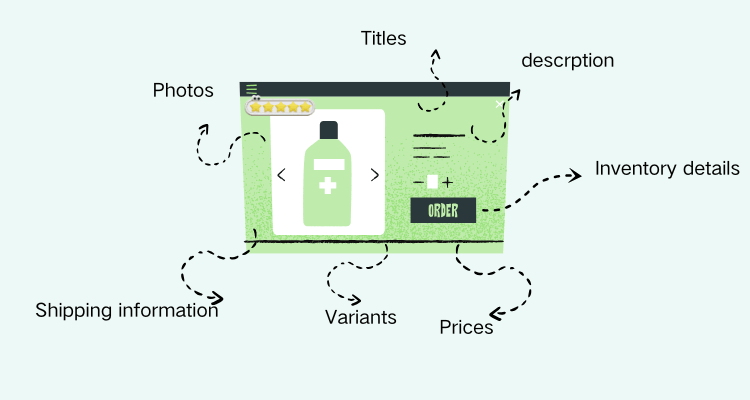
| What you need | Why it matters |
|---|---|
| Product titles | Clear titles improve SEO and customer understanding |
| Product photos | High-quality images increase trust and conversions |
| Product descriptions | Good descriptions help customers make buying decisions |
| Pricing information | Includes retail price, compare-at price, and costs |
| Inventory details | Helps track stock accurately |
| Shipping information | Weight and dimensions affect shipping rates |
| Product variants | Sizes, colors, materials, etc. |
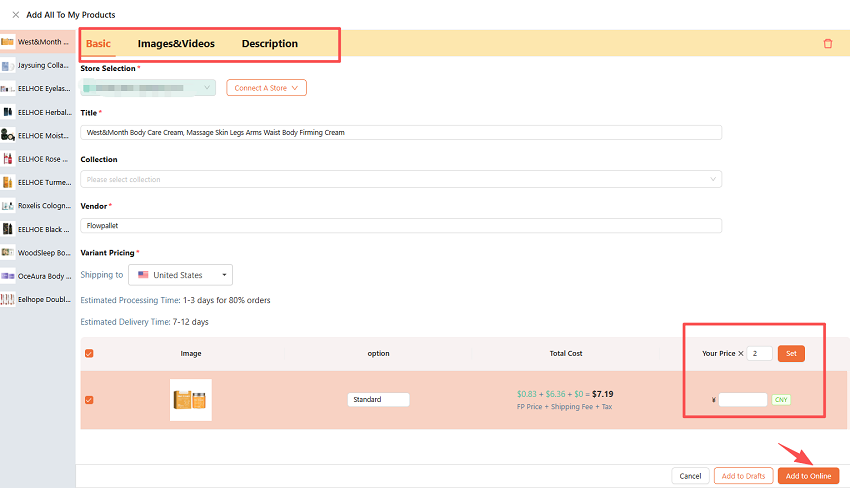
If you plan to add products more efficiently, using a fulfillment platform like Flowpallet can make the process much easier. It has already provided complete product information, including product titles, descriptions, prices, images, videos, variants, and shipping details.
Instead of building every product page from scratch, you can simply select products and import them to Shopify with one click. This saves a huge amount of time, especially for dropshipping stores and large catalogs.
Platforms like Flowpallet are especially useful for:
- Dropshipping businesses
- Cross-border e-commerce stores
- Bulk product imports
- Multi-supplier operations
- Fast-scaling Shopify stores
Another major advantage is automatic syncing. When suppliers update inventory or pricing, the changes can sync directly to your Shopify store, helping reduce manual work and inventory errors.
2. How to add products to Shopify manually
Manual product uploading works best for small stores or businesses with only a few products. You can:
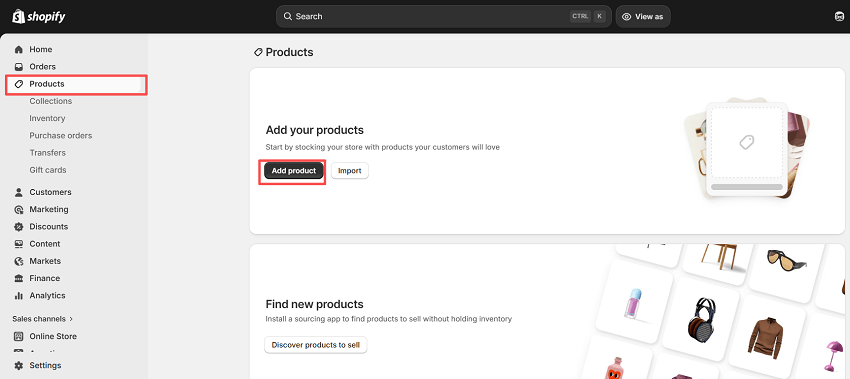
- Log in to your Shopify admin dashboard, then click Products > Add product.
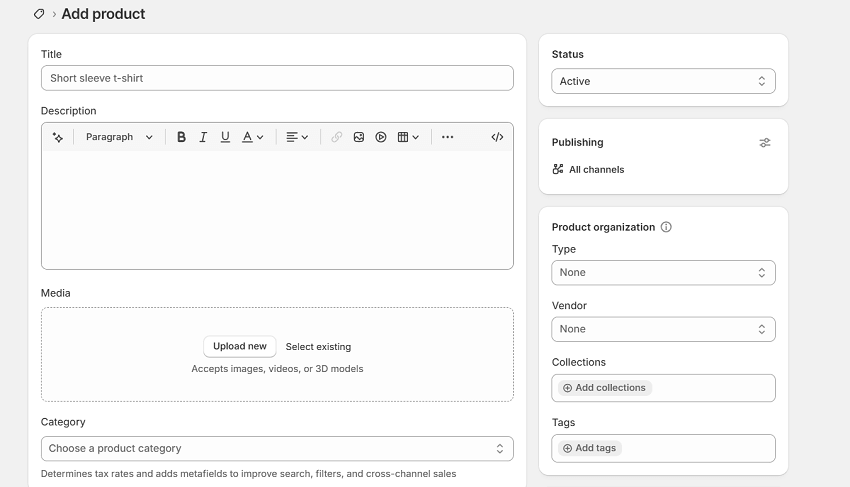
- Enter a clear and searchable product title. Like Wireless Bluetooth Earbuds, minimalist Desk Lamp…
- Add a product description that explains product features, benefits, materials, or specifications, who the product is for, and so on.
- Click Upload new to add photos and images.
- Enter the price details, such as compare-at price (optional) and cost per item (optional).
- Fill in inventory details like SKU, barcode, stock quantity…
- Configure shipping settings.
- Add variants like Size, color, material…
- Then add product type, vendor, collections, tags…
- Preview the product page to check that everything looks correct, then click Save.
3. How to import products to Shopify automatically
Manual uploads are fine when you’re just starting out, but once your product catalog starts growing, automation becomes a game-changer. You can:
1️⃣Use a fulfillment platform
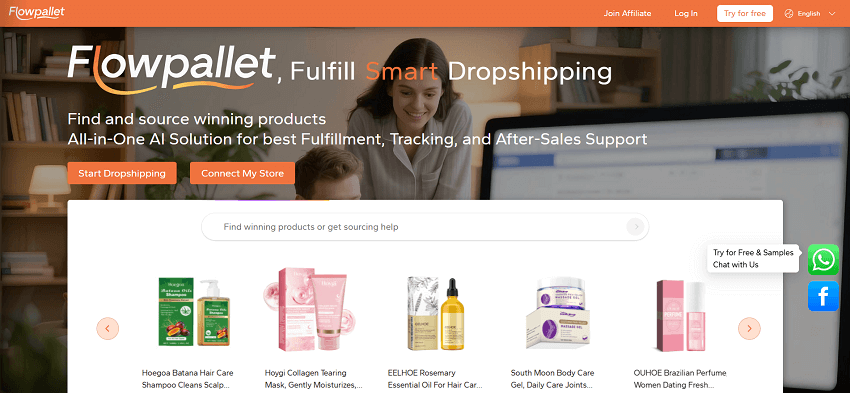
If you're scaling up, fulfillment platforms are probably your smoothest option. Tools like Flowpallet let you import products quickly and seamlessly, keep inventory synced automatically, source products from various suppliers, and do pick and pack fulfillment, all without the constant manual work. You also get fewer overselling headaches along the way.
This approach works especially well when you're dealing with hundreds of SKUs, overseas suppliers, multiple warehouses, or inventory that changes daily. Instead of logging in to edit products by hand, your catalog just... stays up to date.
Just log in to it and connect it to your Shopify store now.
2️⃣ Upload via CSV file
CSV imports are perfect for moving a lot of products at once. Your file can include everything - titles, descriptions, prices, SKUs, variants, image URLs, you name it.
Here's how to do it in Shopify:
Go to Products → Import, upload your CSV, review the formatting, then hit Import products. That's it.
The main perks: bulk editing is easy, uploads are fast, and migrating from another platform becomes way less painful. Just make sure your file is formatted correctly before importing - small errors can cause the whole thing to fail.
3️⃣Use a dropshipping app
For beginners, especially, dropshipping platforms or apps are the most hands-off way to add products. Most popular apps let you import items in one click, sync prices, update inventory in real time, and handle fulfillment automatically, all plugged straight into Shopify.
A typical setup looks like this:
- Install the app
- Connect your supplier
- Pick the products you want
- Edit titles and descriptions
- Publish to your store
One thing worth noting: even though these apps do most of the heavy lifting, don't just copy-paste supplier content as-is. Customizing your product pages will set you apart and help with SEO.
![How to Start Dropshipping on Shopify? [Guide Here]](https://cdn.flowpallet.com/blog/default/Mar_Tue/summary-how-to-start-dropshipping-shopify.png)
4. Final words
Learning how to add products to Shopify is one of the first major steps in building an e-commerce business. Whether you upload products manually or automate the process with CSV imports, dropshipping apps, or fulfillment platforms like Flowpallet, the goal is the same: create clean, professional product pages that customers trust.
Start simple, stay organized, and improve your listings over time. Even small optimizations can make a big difference in conversions and store growth.
